Is Cal AI free? What it costs in 2026
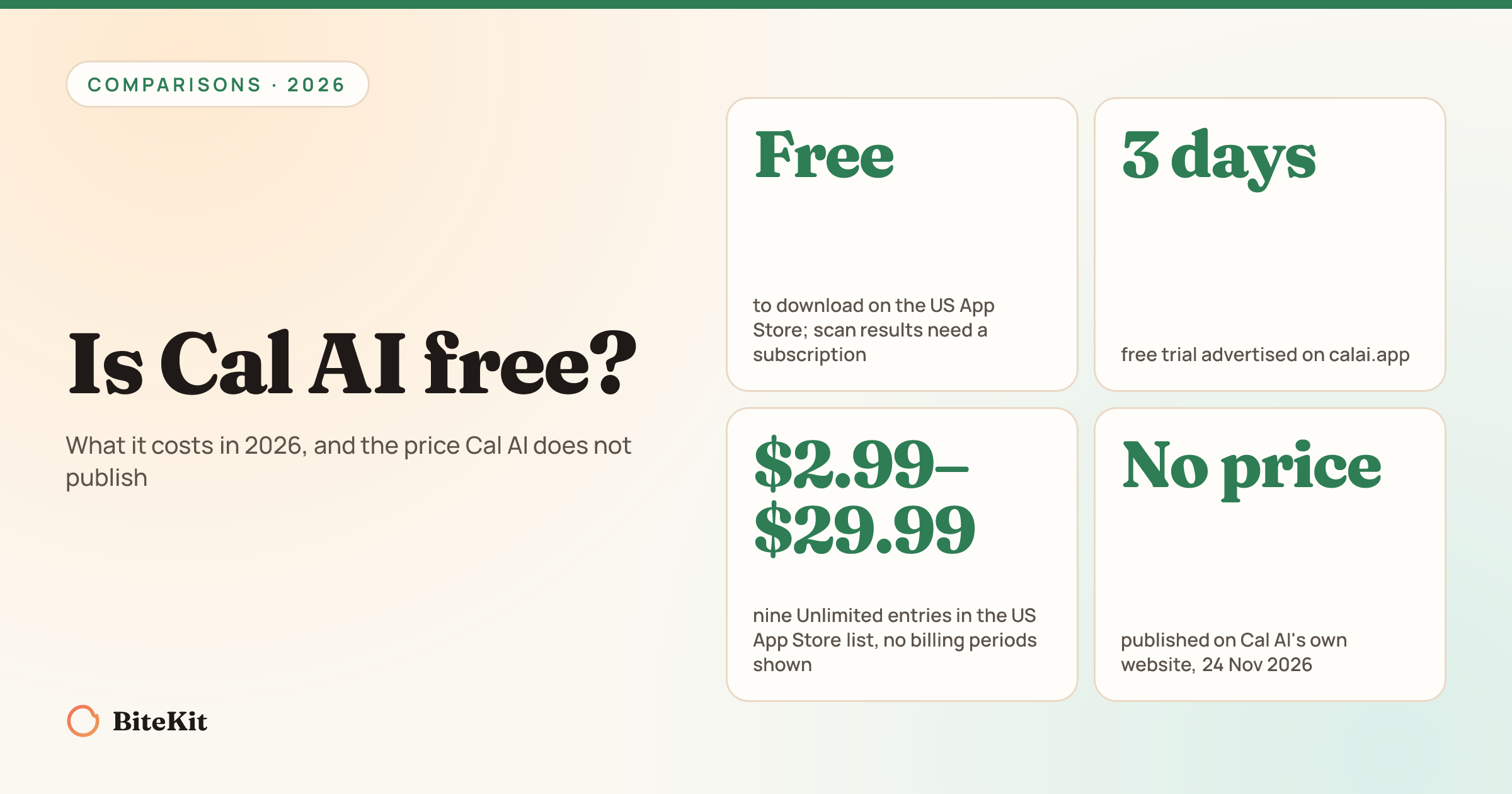
Cal AI is free to download, but scan results need a subscription after a 3-day trial. It publishes no price; the US App Store lists $2.99 to $29.99.
·Updated ·9 min read
On this page
Cal AI is free to download, but it is not free to use. The US App Store lists the app as "Free", its App Store description says "FOOD SCANNING ANALYSIS RESULTS REQUIRE A SUBSCRIPTION", and calai.app advertises a 3-day free trial. What the subscription costs after the trial is something Cal AI does not publish: its website states no price, and the US App Store's in-app purchase list shows nine "Unlimited" entries from $2.99 to $29.99 with no billing periods, as of 24 November 2026.
BiteKit is our app and it competes with Cal AI, so treat our view as interested. We did not subscribe to Cal AI or go through its paywall: every figure below comes from Cal AI's own pages, its US App Store listing and press reports, checked on 24 November 2026, as set out in the methodology.
Key findings
- 1The download is free; the results are not. Apple's lookup record for the US App Store gives Cal AI's price as "Free", and the App Store description says "FOOD SCANNING ANALYSIS RESULTS REQUIRE A SUBSCRIPTION".
- 2The free trial is 3 days. The sign-up prompt on calai.app reads "CLAIM YOUR 3-DAY FREE TRIAL", as of November 2026.
- 3Cal AI publishes no price on its website. We found none on calai.app's home page, support FAQ or terms of service on 24 November 2026.
- 4The US App Store lists ten in-app purchases, from $0.99 to $29.99. Nine are named "Unlimited" or "Unlimited Plan", at $2.99, $5.99, $9.99, $19.99 and $29.99. Apple's list shows no billing periods, and Cal AI does not explain the entries.
- 5Apple briefly removed Cal AI from the App Store in April 2026 over how it charged. Apple told TechCrunch that the paywall showed a weekly calculated price more prominently than the amount billed. The developer fixed the issues and the app returned.
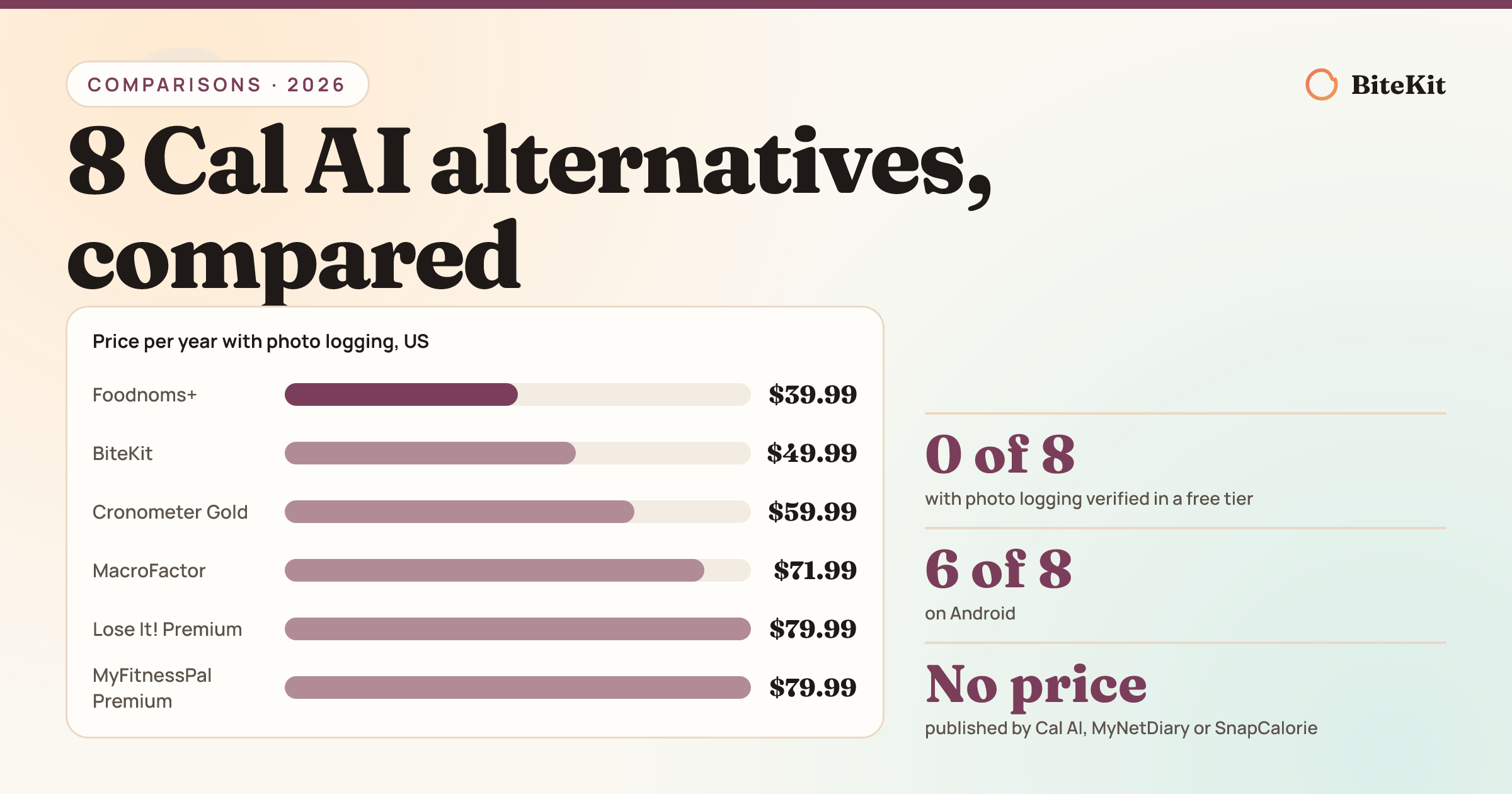
- 6Six other trackers publish a US annual price, from $39.99 to $79.99. Foodnoms+ is the lowest; Lose It! Premium and MyFitnessPal Premium are the highest. MyFitnessPal owns Cal AI, as TechCrunch reported on 2 March 2026.
Free
Price of the Cal AI download on the US App Store
scan results need a subscription
Source: Apple iTunes lookup API
$2.99–$29.99
Nine Unlimited entries in the US App Store's in-app purchase list
billing periods not shown
Source: US App Store listing
not published
Cal AI's subscription price on its own website, 24 November 2026
home page, FAQ and terms checked
Source: calai.app
What is free and what is not#
Cal AI logs a meal from a photo, a barcode or a description. Four things can be checked without paying anything.
A free trial is a subscription that has not charged you yet. It renews into a paid plan unless you cancel, and Apple's support page says to cancel at least 24 hours before a trial ends if you don't want it to renew.
Some blogs describe a free plan for Cal AI. We did not find one in Cal AI's own pages or in its App Store description. The only free period we could verify is the 3-day trial.
What the App Store lists#
Cal AI's website gives no price, so the only published figures are in Apple's list of in-app purchases, which is part of every App Store listing. Here is that list for the US, in the order Apple shows it.
Cal AI's ten in-app purchases on the US App Store
US dollars, names and order as listed on 24 November 2026; Apple's list gives no billing periods
| Label | Value |
|---|---|
| 1. Unlimited | $29.99 |
| 2. Unlimited Plan | $19.99 |
| 3. Unlimited | $9.99 |
| 4. Unlimited | $19.99 |
| 5. Streak Restore | $0.99 |
| 6. Unlimited | $2.99 |
| 7. Unlimited | $29.99 |
| 8. Unlimited | $29.99 |
| 9. Unlimited | $5.99 |
| 10. Unlimited | $5.99 |
Apple's list gives a name and a price for each product, and nothing else. It does not say how often a price is charged or which entries are offered to new subscribers today. Cal AI does not explain the ten entries anywhere we looked, so we can't tell you which one is a week, a month or a year, and we won't guess.
Three more things are stated but not priced:
- A family plan. Cal AI's support FAQ answers a question about one. It gives no price.
- Subscriptions sold outside Apple. The same FAQ says subscriptions are bought through the App Store, through Google Play, or "directly from us (from your browser)" through Stripe. Apple's list covers only purchases made through Apple.
- Android. Cal AI is on Google Play, where it had a 4.54 average from 272,499 ratings on 24 November 2026, against 4.80 from 377,003 ratings on the US App Store. We did not record Android prices. The FAQ says a subscription is tied to the platform you bought it on, so moving from iPhone to Android means buying a new one.
What Apple said about the paywall in April 2026#
How Cal AI presented its price has been the subject of one dated, public enforcement action by Apple. Apple removed the app in the week of 13 April 2026; TechCrunch and MacRumors reported Apple's reasons, and the app's return, on 21 April. According to those reports, Apple named three problems:
- Payment. The app used an embedded Stripe payment flow in place of Apple's in-app purchase, against App Review Guideline 3.1.1.
- Price display. The paywall showed the weekly calculated price more prominently than the amount the user would be billed, and its free trial toggle did not make the automatic renewal clear, against Guideline 3.1.2(c).
- A second offer. People who declined the first subscription offer were shown a second, different purchase flow, which Apple put under section 5.6 of its Developer Code of Conduct.
Both outlets say the developer addressed the issues and the app came back. We did not go through the paywall, so we can't describe what it looks like today. In our view the episode is a good reason to read a subscription screen slowly, in Cal AI or any other app: a price worked out per week can make a larger charge look small.
How to see the real price before you pay#
The price that applies to you should appear twice before any money moves: on the app's paywall, and on Apple's own purchase sheet. This works for Cal AI and for every other subscription app on iPhone.
Five checks before and after you start a trial
Find the amount billed on the paywall
Look for the total charged and how often. A per-week or per-month figure beside a longer plan is a breakdown, not the charge.
Check the trial terms
Note how many days are free, and what price and period the plan renews at when they end.
Read Apple's purchase sheet before you confirm
The system sheet you approve with Face ID or the side button names the plan and its price. If it differs from what you expected, cancel the sheet.
Open Subscriptions in Settings
On iPhone: Settings, your name, Subscriptions. The plan you just started is listed there.
Cancel in the same place if you don't want to pay
Apple says to cancel a trial at least 24 hours before it ends. Deleting the app does not cancel anything.
Sources: Apple Support, cancel a subscription; Cal AI support FAQ
Apple's guidance for developers says the amount that will be billed must be the most prominent pricing element in the purchase flow. If the largest number on a paywall is a per-week figure for a plan billed by the year, look for the total before you continue.
Cal AI's support FAQ gives the same iPhone path, Settings, then your name, then Subscriptions, then CalAI, then Cancel Subscription, and warns: "Deleting the app does NOT cancel your subscription." It adds two cases:
- Cal AI is not in your Subscriptions list. The FAQ says this means you bought directly from Cal AI. In the app, go to Profile, then Manage Subscription, then Cancel Subscription. Refunds for those purchases are handled by email; refunds for App Store purchases go through Apple.
- You subscribed on Android. The FAQ's path is Google Play, then your profile icon, then Payments & subscriptions, then Subscriptions.
What you get for the subscription#
The subscription entries in Apple's list are all named "Unlimited" or "Unlimited Plan". These are the features we could verify, as of November 2026:
- Logging by photo, barcode or description. The home page says: "Snap a photo, scan a barcode, or describe your meal". The FAQ also mentions manual search and photographing a nutrition label.
- MyFitnessPal's food database. TechCrunch reported on 2 March 2026 that MyFitnessPal had acquired Cal AI, that it stays a separate app, and that it is now integrated with MyFitnessPal's food database.
- Apple Health and Google Fit. The FAQ describes connecting Apple Health on iPhone and Google Fit on Android.
- iPhone and Android. The FAQ says Cal AI needs iOS 18 or higher, or Android 10 or higher.
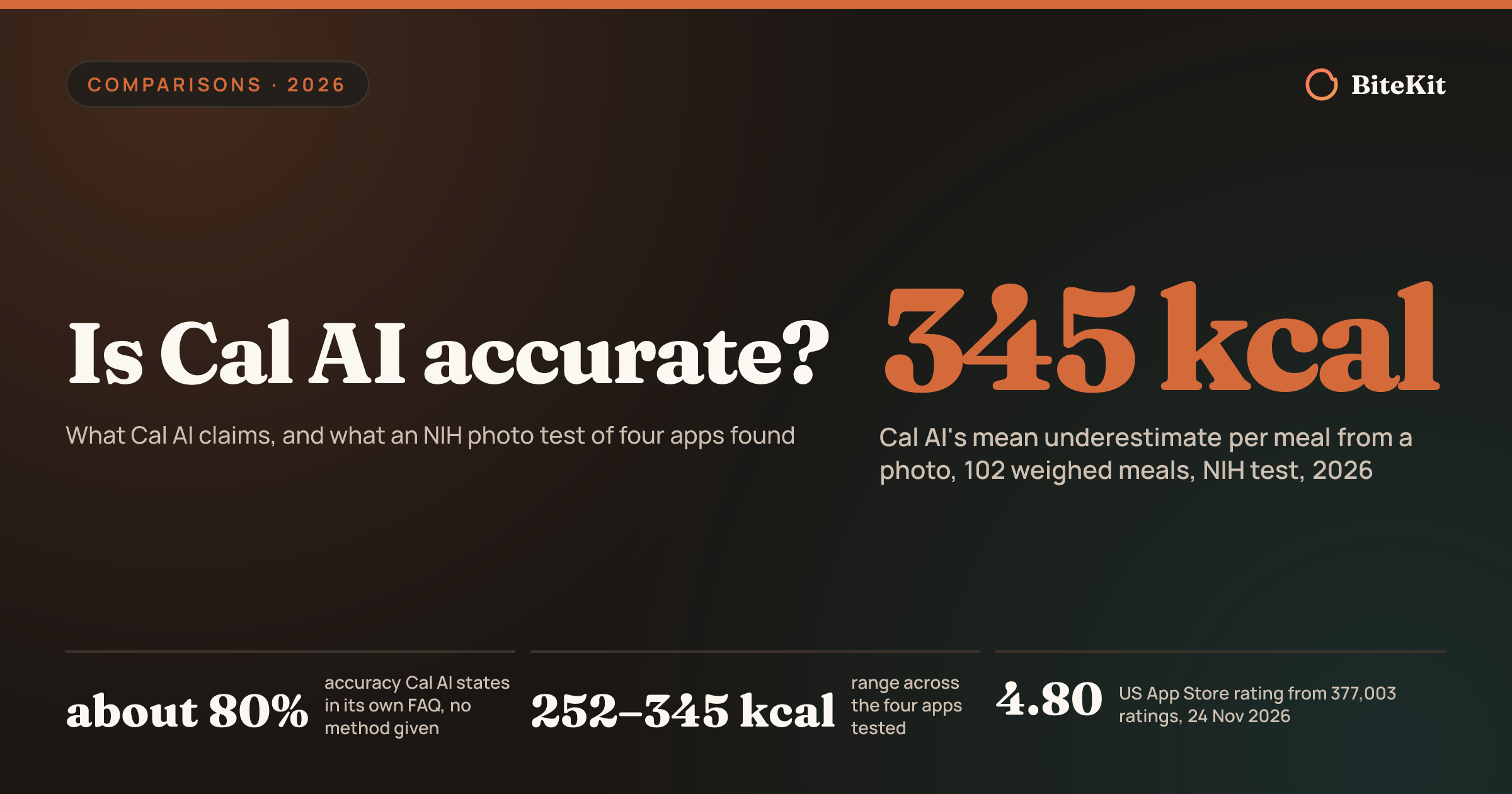
The calorie numbers are estimates. Cal AI's terms of service call them "automated approximations", and in an NIH test presented in July 2026, a conference abstract, its photo estimates came out 345 kcal below the weighed reference per meal on average. The detail is in Is Cal AI accurate?.
What stays unverified. We could not confirm any of these from a primary source:
- the price and billing period of each plan, and the price of the family plan;
- whether Cal AI has voice logging, which calai.app does not mention;
- whether it has an Apple Watch app: the App Store's compatibility section lists watchOS 10.0 or later, but Cal AI does not describe one.
One thing the FAQ rules out: Cal AI does not import your history from MyFitnessPal.
What other calorie trackers publish#
Six other trackers we checked state a US price with its billing period, on their own site, in their App Store description, or in an App Store list that labels the period. Prices are for the US, as of 24 November 2026.
MyFitnessPal's trial is for people who have never had Premium. Foodnoms, Cronometer, Lose It! and MyFitnessPal also have a free tier you can keep using; MacroFactor, BiteKit and Cal AI do not.
Annual price of six calorie trackers that publish one
US dollars per year, as listed on 24 November 2026; Cal AI publishes no annual price
| Label | Value |
|---|---|
| Foodnoms+ | $39.99 (free tier available) |
| BiteKit | $49.99 (our app; no free tier) |
| Cronometer Gold | $59.99 (free tier available) |
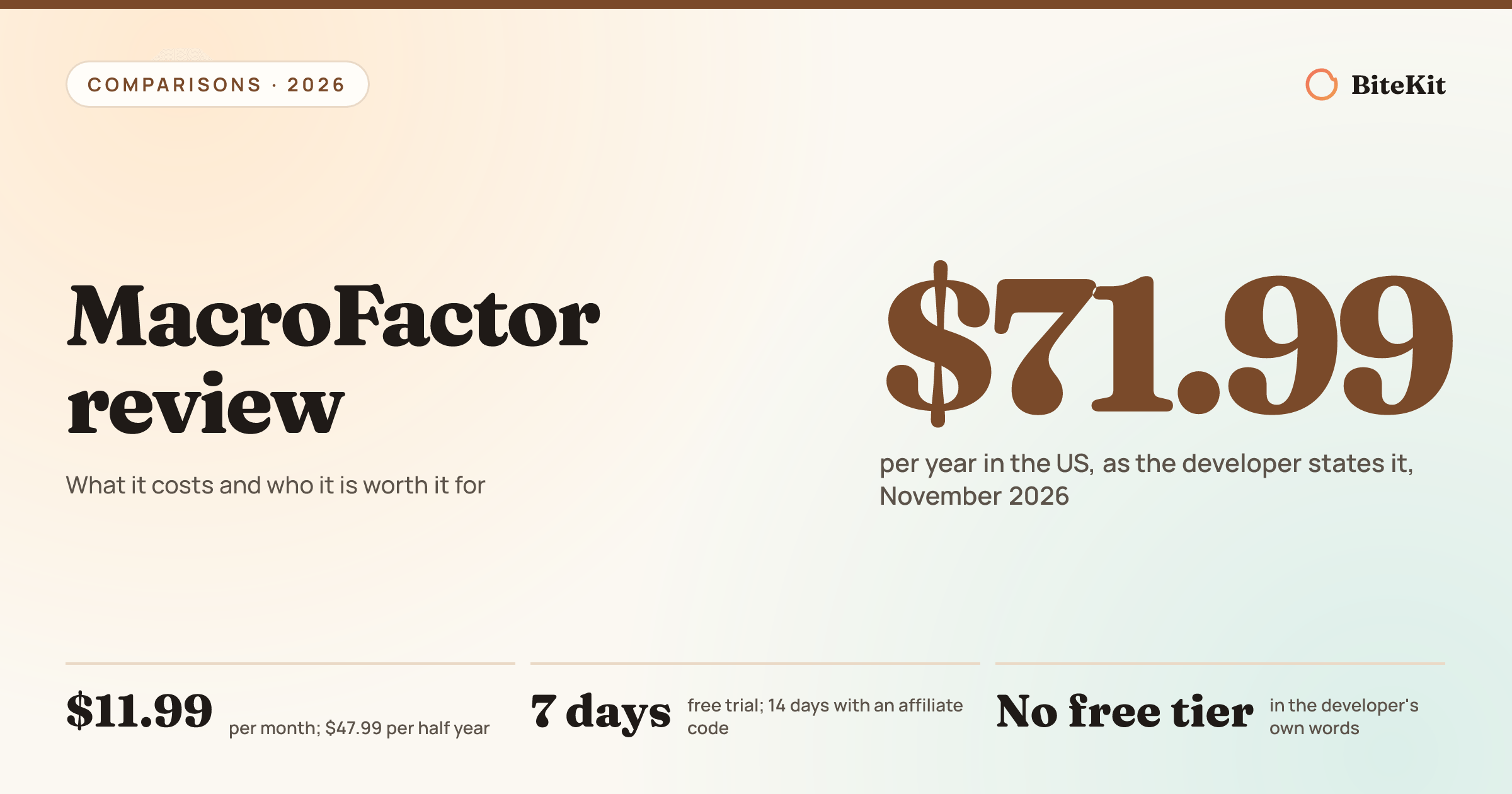
| MacroFactor | $71.99 (no free tier) |
| Lose It! Premium | $79.99 (free tier available) |
| MyFitnessPal Premium | $79.99 (free tier available; owns Cal AI) |
Sources: MyFitnessPal Premium page; Lose It! help centre; MacroFactor, App Store description; Cronometer Gold page; US App Store in-app purchase lists for Foodnoms and BiteKit
Monthly price of five calorie trackers that publish one
US dollars per month on a monthly plan, as listed on 24 November 2026
| Label | Value |
|---|---|
| Foodnoms+ | $5.99 |
| BiteKit | $9.99 (our app; also $3.99 a week) |
| Cronometer Gold | $10.99 |
| MacroFactor | $11.99 (also $47.99 a half year) |
| MyFitnessPal Premium | $19.99 |
Sources: MyFitnessPal Premium page; MacroFactor, App Store description; Cronometer Gold page; US App Store in-app purchase lists for Foodnoms and BiteKit
These are list prices. They differ by country, and the App Store lists extra price points for some of these apps too, so the paywall check above applies to all of them. Features and free tiers are compared in Cal AI alternatives and MyFitnessPal alternatives.
Where BiteKit fits#
BiteKit is our app, and on price it is the same kind of product as Cal AI: a paid photo tracker with a 3-day free trial and no free tier. Its prices are published. After the trial it is $3.99 a week, $9.99 a month or $49.99 a year in the US App Store, and its in-app purchase list labels each entry with its period: "Unlimited (1 Week)", "Unlimited (1 Month)" and "Unlimited (1 Year)".
We can't tell you whether that is more or less than Cal AI, because we don't know what Cal AI charges.
What a BiteKit subscription covers: the day view and Home Screen widgets
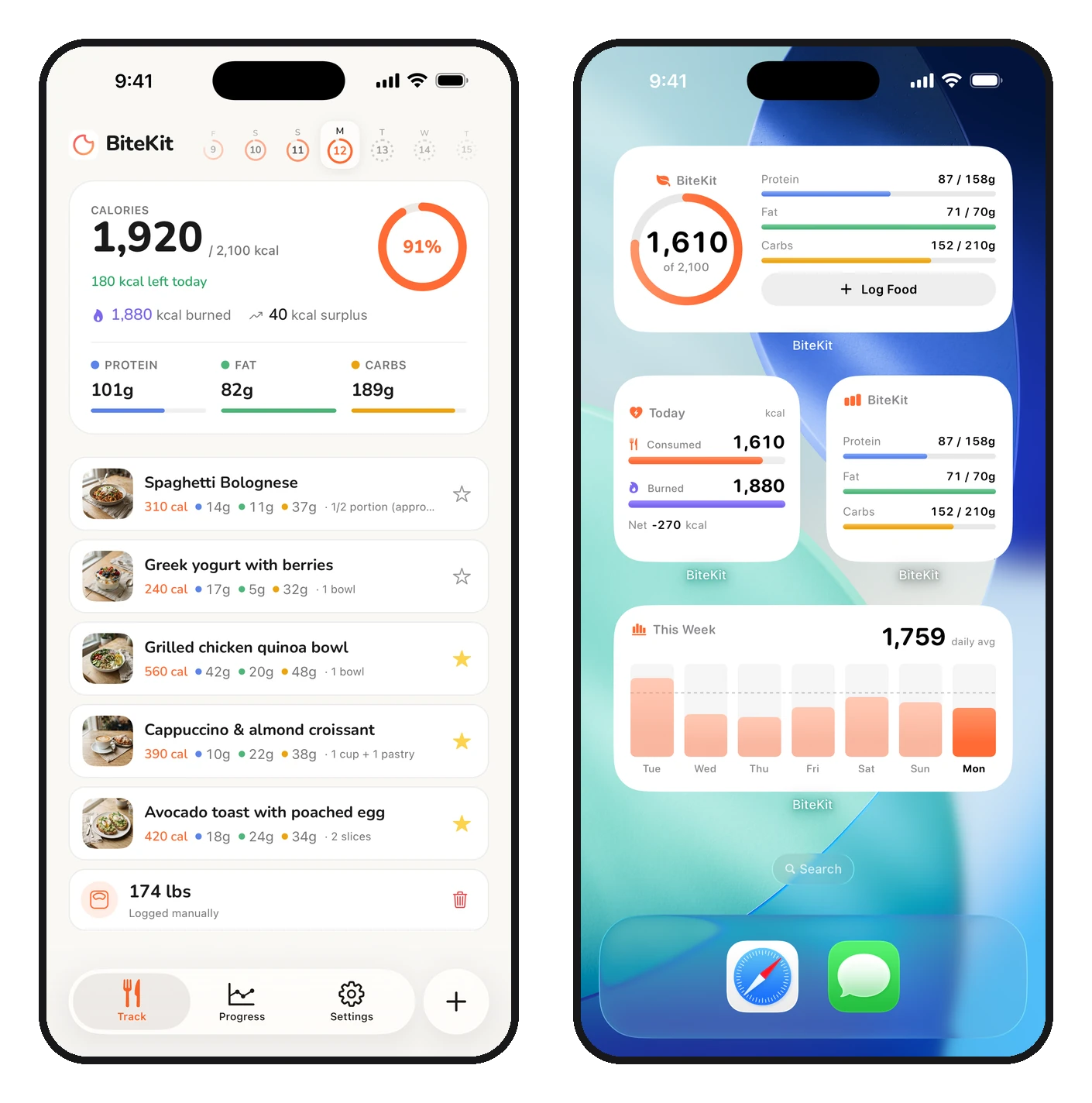
Source: BiteKit for iPhone, screenshots by the BiteKit team
BiteKit logs by photo, voice or text on iPhone, with an Apple Watch app, widgets and Siri. What it lacks: no barcode scanner (Cal AI has one), no water tracking, fasting timer, recipes, micronutrients or AI coach, and no Android, iPad or web app. Its numbers are estimates, and we have published no accuracy data for it.
Which one should you pick#
- You want to try Cal AI without paying: use the 3-day trial, read the price on Apple's purchase sheet before you confirm, and cancel in Settings at least 24 hours before the trial ends if you don't want to be charged.
- You want to pay nothing at all: Cal AI is not the app for that. Cronometer, Foodnoms and Lose It! have free tiers, but photo logging is a paid feature in all three.
- You want to know the price before you install: Foodnoms+, BiteKit, Cronometer Gold, MacroFactor, Lose It! Premium and MyFitnessPal Premium all publish one. Cal AI does not.
- You want paid photo logging on Android: Cal AI runs on Android. So does MacroFactor, which states its price, $71.99 a year, in its App Store description.
- You want the lowest published price for AI photo logging on Apple devices, among the apps on this page: Foodnoms+ at $39.99 a year, with a free tier underneath it. BiteKit is $49.99 a year and has no free tier.
- Accuracy matters more to you than price: read Is Cal AI accurate? first. No subscription price changes how photo estimates behave.
Methodology#
Sources. Cal AI's home page, support FAQ and terms of service; its US App Store listing (description, in-app purchase list, compatibility) and Apple's iTunes lookup API for the download price and ratings; its Google Play listing for the Android rating; TechCrunch (2 March 2026, 21 April 2026) and MacRumors (21 April 2026) for dated events. Apple's support article on cancelling and its subscription guidance for developers are the sources for the paywall checks. Prices of the other six apps come from each developer's pricing page, help centre or App Store description, linked under the charts.
Date checked. 24 November 2026, US storefront.
Disclosure. We make BiteKit, which competes with Cal AI. This page has no affiliate links. We did not subscribe to Cal AI or run hands-on tests of any other app.
Limits.
- We did not go through Cal AI's paywall, so we give no price for it. The App Store's in-app purchase list shows names and prices without billing periods, and it can't tell us which entries are offered today.
- We did not record Android prices or prices on Cal AI's web checkout.
- Prices vary by country and can vary by paywall test. We name a monthly or annual price only where the developer states it or the App Store list labels it.
- The April 2026 removal is reported from TechCrunch and MacRumors, which cite Apple. We have not seen Cal AI's paywall before or after it.
- The steps for checking a price describe how App Store purchases work on iPhone in general. We did not test them inside Cal AI.
- Ratings change daily and are user ratings, not quality scores. Features and prices change with updates.
FAQ#
Is Cal AI free?#
Cal AI is free to download, but it is not free to use: its App Store description says food scanning results require a subscription, as of November 2026. The only free period we could verify is the 3-day free trial advertised on calai.app.
How much does Cal AI cost per month?#
Cal AI does not publish a monthly price, as of November 2026. Its website states no price, and the US App Store's in-app purchase list shows nine "Unlimited" entries at $2.99, $5.99, $9.99, $19.99 and $29.99 without billing periods. The price and period that apply to you are shown on the paywall and on Apple's purchase sheet before you confirm.
Does Cal AI have a free trial?#
Yes. calai.app advertises a 3-day free trial, as of November 2026. A trial renews into a paid subscription unless you cancel, and Apple says to cancel at least 24 hours before a trial ends.
How do I cancel a Cal AI subscription or free trial?#
On iPhone, open Settings, tap your name, tap Subscriptions, choose Cal AI and tap Cancel Subscription. Cal AI's FAQ says that deleting the app does not cancel the subscription, and that if Cal AI is not in that list you bought it directly and should cancel in the app under Profile, then Manage Subscription.
What did Apple say about Cal AI's paywall?#
Apple briefly removed Cal AI from the App Store in the week of 13 April 2026. According to TechCrunch and MacRumors on 21 April 2026, Apple said the paywall showed a weekly calculated price more prominently than the amount billed and that the app had bypassed in-app purchase with a Stripe payment flow. The developer fixed the issues and the app returned.