AI Calorie Counter App: Instant, Accurate Tracking
Track meals effortlessly with an AI calorie counter app. Use photos, voice, & text for accurate logging. Simplify diet management in 2026.
Dinner is getting cold. Your phone is in one hand, a fork is in the other, and you're typing something like “chicken rice bowl with sauce maybe homemade” into a search box that returns ten versions of the same meal. Then comes the guessing. Was that one cup of rice or more? How much oil was in the pan? Did the dressing matter enough to log?
That friction is why so many people quit tracking. Not because they don't care, but because the process feels bigger than the meal itself. A good ai calorie counter app changes that. It turns logging from a chore into a quick check-in, and it can do it through a photo, a voice note, or a simple sentence.
The useful part isn't just speed. It's understanding what the app is doing with your food data, how accurate those estimates are, and whether your meal history stays on your phone or gets sent elsewhere. That's where a lot of readers get stuck, especially if they want the convenience of AI without giving up control of sensitive health information.
The End of Tedious Food Logging
Manual calorie tracking usually fails in ordinary moments. Breakfast is rushed. Lunch is eaten between meetings. Dinner includes leftovers, a sauce you didn't make, and a side dish that isn't easy to search. By the time you've hunted through a database and adjusted portions, the meal is over and your patience is gone.

That's the old way. The newer approach is much closer to how people already behave. You take a picture, say what you ate, or type it in plain language. Instead of asking you to think like a database, the app tries to understand you like a person.
Why friction matters more than motivation
Nutrition tracking often ceases, not from a loss of interest, but because the task consistently interrupts daily life. That's why the shift to AI-assisted logging matters. In apps like MyFitnessPal, AI features reduce logging time by up to 2x and cut tracking errors by 31%, according to Jotform's review of AI calorie trackers.
That kind of change matters because consistency beats perfection. If logging takes a few seconds instead of feeling like homework, you're far more likely to keep doing it on busy weekdays, not just on highly motivated Mondays.
If you're still comparing old-school tools with newer options, it helps to see how modern meal trackers differ from the handwritten logbook or spreadsheet mindset. The true upgrade isn't cosmetic. It's the drop in daily effort.
What this feels like in real life
A simple lunch gives a good example:
- Traditional logging: Search each ingredient, pick the closest match, estimate portions, and hope the entries are accurate.
- AI-assisted logging: Snap the plate or say “turkey sandwich, apple, handful of chips,” then review the estimate.
- Result: Less time spent searching, less mental drag, and a cleaner history of what you ate.
Practical rule: The best tracking method is the one you can still use when you're tired, distracted, or eating out.
If you want a simpler look at that shift from manual entry to faster app-based tracking, this guide to an easy food tracking app gives a useful starting point.
From Photo to Plate Deconstructing the AI
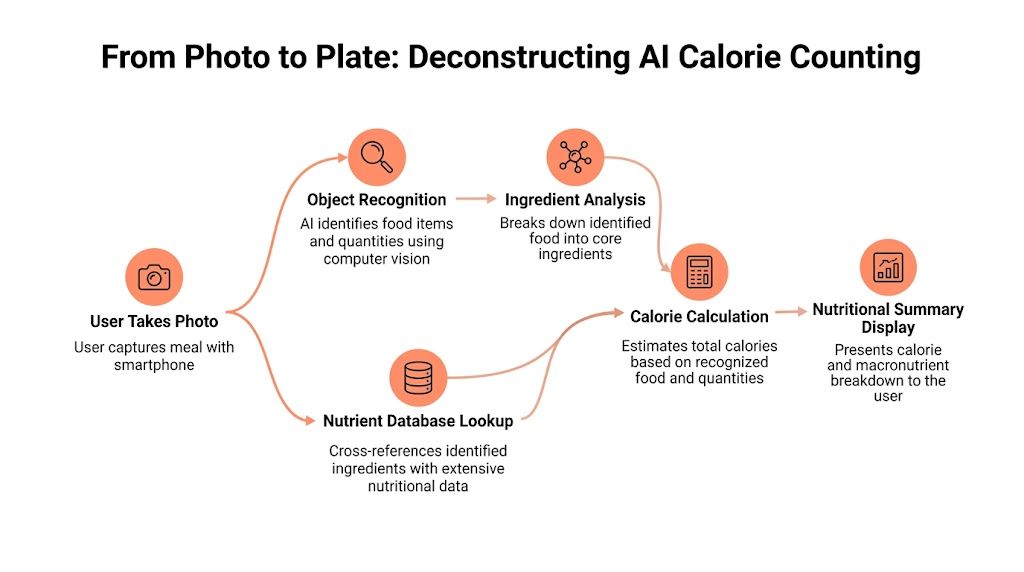
When people first use an ai calorie counter app, it can feel like magic. You show the app a meal, and seconds later it gives you calories and macros. But the process is less mysterious when you break it into parts.
It serves as a very fast kitchen assistant. One part looks at the plate. Another part checks a nutrition reference. A third part translates your words if you spoke or typed the meal. Together, those pieces turn a messy real-world meal into something trackable.
Computer vision acts like the app's eyes
The first major system is computer vision. That's the part that examines the image and tries to identify what's on the plate. A useful way to think about it is this: computer vision doesn't “know” lunch the way you do. It compares shapes, textures, colors, edges, and visual patterns to examples it learned from earlier food images.
According to Google AI's Calorify project page, apps like Calorify achieve 92% accuracy in calorie tracking through advanced computer vision models trained on diverse food datasets, using object detection algorithms such as YOLO or Mask R-CNN variants to segment images into individual food items and estimate portion sizes.
That sentence is technical, so here's the plain-language version:
- The app separates the plate into parts. Rice is one area. Chicken is another. Vegetables may be split into several items.
- It labels each part. The visual model guesses what each section most likely is.
- It estimates amount. It tries to infer portion size from the image.
- It connects that guess to nutrition data. Once the food is identified, the app can estimate calories, protein, carbs, and fat.
If the meal is neat and visible, this works better. If it's covered in sauce, stacked in a bowl, or photographed in dim light, the app has a harder job.
Language models handle the human side
Photos aren't the only input. Many apps also accept voice and text. That's where natural language processing, or NLP, comes in. NLP is the part that interprets a sentence like “two eggs, buttered toast, and coffee with milk” without making you choose from endless drop-down menus.
You can think of NLP as the app's translator. It takes messy human phrasing and turns it into structured food entries. That's useful because people rarely describe food in perfect database language.
Here are a few examples of what a language-aware app needs to untangle:
- Size words: “small,” “large,” “half,” “extra”
- Cooking clues: “grilled,” “fried,” “baked”
- Grouped meals: “chicken salad wrap and iced latte”
- Casual phrasing: “some almonds” or “a bowl of chili”
A smart app combines this language input with image recognition when available. If your photo shows pasta but your voice note adds “with chicken and extra parmesan,” the final estimate can be more complete than either input alone.
A photo tells the app what the meal looks like. Your words tell it what the camera can't see.
If you'd like a practical look at that image-first workflow, this article on a photo calorie counter shows how photo logging fits into everyday tracking.
How Accurate Is AI Food Recognition
Accuracy is the first serious question for many, and rightly so. If an app is fast but unreliable, it won't help much. The good news is that top-tier tools are no longer just novelty scanners. They can be impressively capable when the meal is visible and the input is clear.
What the strongest apps can do
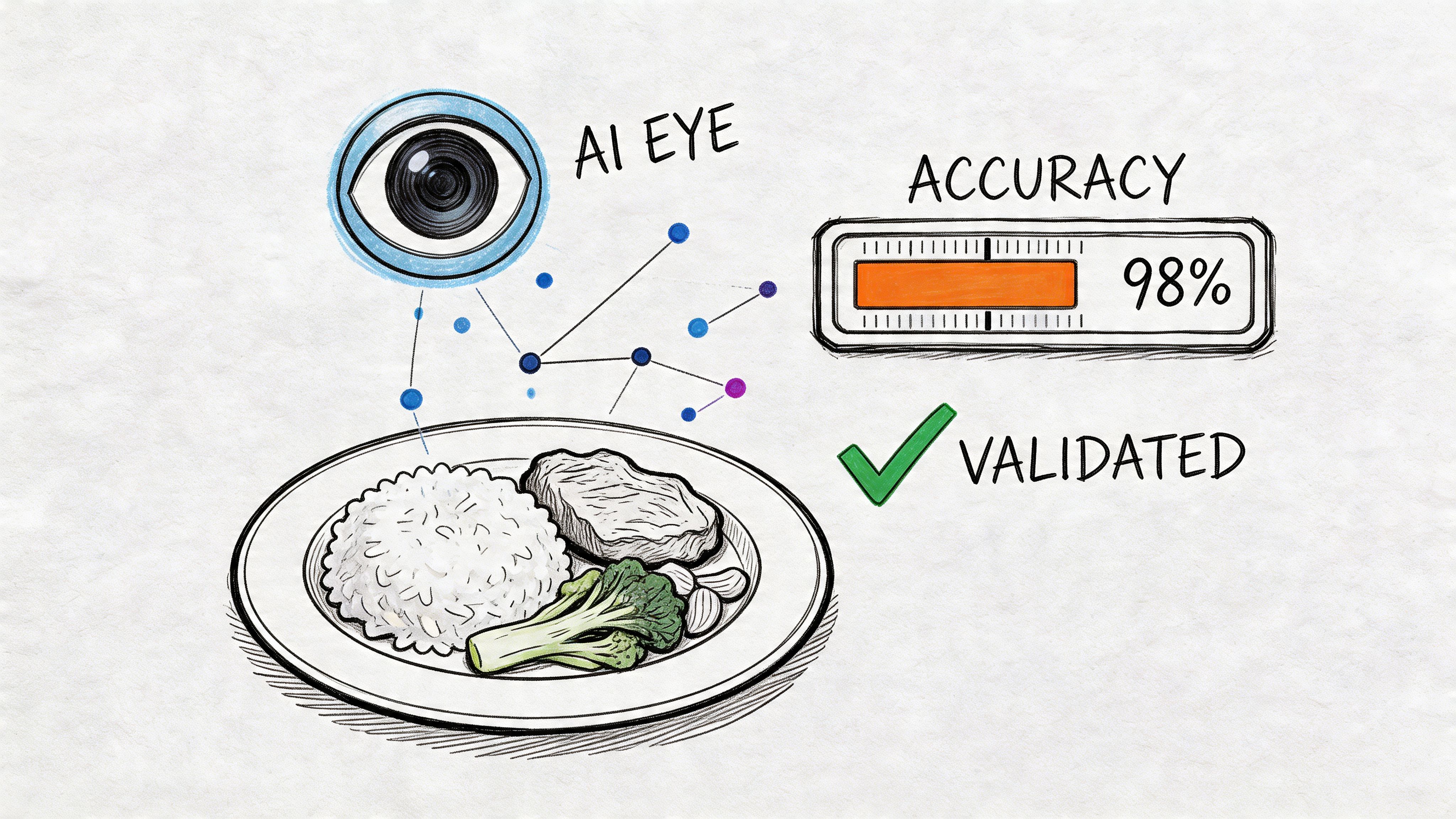
According to NutriScan's roundup of free AI calorie tracking apps, apps like SnapCalorie and Cal AI demonstrate 92-97% accuracy in calorie estimation from meal photos. That same source states SnapCalorie achieved a 16% error rate, while human dietitians averaged 41% error rates in studies.
Those numbers don't mean every single meal is nearly perfect. They mean the best systems can perform very well under the right conditions, and in some settings they can outperform human visual estimation.
That matters because many people assume a trained human will always beat an app. In nutrition logging, that isn't always true. Humans are affected by bias, memory, portion distortion, and simple inconsistency. AI doesn't get tired of looking at plates.
Where accuracy drops
The weak spots are pretty intuitive once you know how the system works.
- Mixed dishes: Stews, casseroles, curries, burrito bowls, and restaurant entrees can hide multiple ingredients.
- Poor lighting: Shadows flatten textures and make foods harder to separate.
- Occlusion: One food partly covering another can confuse recognition.
- Invisible extras: Oils, dressings, and ingredients mixed in during cooking may not be obvious from the image.
Better input usually beats better guessing. A clearer photo and a quick correction from you can make the estimate far more useful.
How to get the best result from the app
You don't need lab conditions. But a few habits help:
- Use a clear angle: Show the full plate rather than shooting from directly overhead if foods are piled up.
- Add missing context: If the app can't see the olive oil, sauce, or added cheese, say it or type it.
- Correct obvious misses: If rice is tagged as couscous, fix it. That small edit improves the log immediately.
- Be realistic: Use the app as a decision tool, not as a promise of exact chemistry.
For most healthy adults tracking calories or macros, close and consistent is often more useful than trying to chase perfect precision with manual entry and then giving up after three days.
Why AI Tracking Is a Sustainable Habit
The biggest benefit of an ai calorie counter app isn't that it feels futuristic. It's that it removes enough friction for tracking to become repeatable. Nutrition habits usually break at the point of inconvenience, not the point of knowledge.
Individuals generally know the basics. They know soda counts. They know protein matters. They know restaurant meals can run high. The challenge is capturing daily intake without turning every meal into admin work.
The habit sticks because the action is small
Manual tracking asks a lot from your attention. You need to remember ingredients, estimate amounts, search entries, compare brand names, and clean up the log when it looks wrong. That creates too many chances to skip the task.
AI lowers that mental load. You record what happened, review the estimate, and move on. The habit starts to feel less like bookkeeping and more like brushing your teeth. Short, ordinary, and easy to repeat.
A sustainable food log usually has three qualities:
- Low effort: You can use it when you're busy.
- Fast feedback: You quickly see how the meal affects your day.
- Little shame: The app records information, not moral success or failure.
It reduces self-reporting bias
People don't just forget what they ate. They often reshape it in memory. A snack becomes “just a few bites.” A large serving becomes “pretty standard.” AI doesn't remove all bias, but it can reduce the amount of hand-waving that creeps into self-reporting.
That objectivity helps in subtle ways. You stop negotiating with your own memory. You start seeing patterns. Maybe your protein intake drops at lunch. Maybe weekends look different than you thought. Maybe “healthy salads” are carrying more calorie-dense toppings than expected.
It supports learning, not just logging
Used well, an AI tracker becomes a mirror. Over time, people notice which meals keep them full, which snacks are easy to overeat, and which routines support their goals. That's much more valuable than staring at a single number in isolation.
The most effective users usually don't obsess over one meal. They look for trends:
- Which breakfast keeps hunger stable
- Whether dinner portions drift upward late in the week
- How often high-calorie add-ons show up without notice
That shift matters. You're no longer tracking to “be good.” You're tracking to understand your own behavior.
Logging Your First Meal with BiteKit
Let's make this concrete with a common meal: grilled chicken, roasted vegetables, and rice. You open the app before the first bite, hold your phone over the plate, and take a photo.
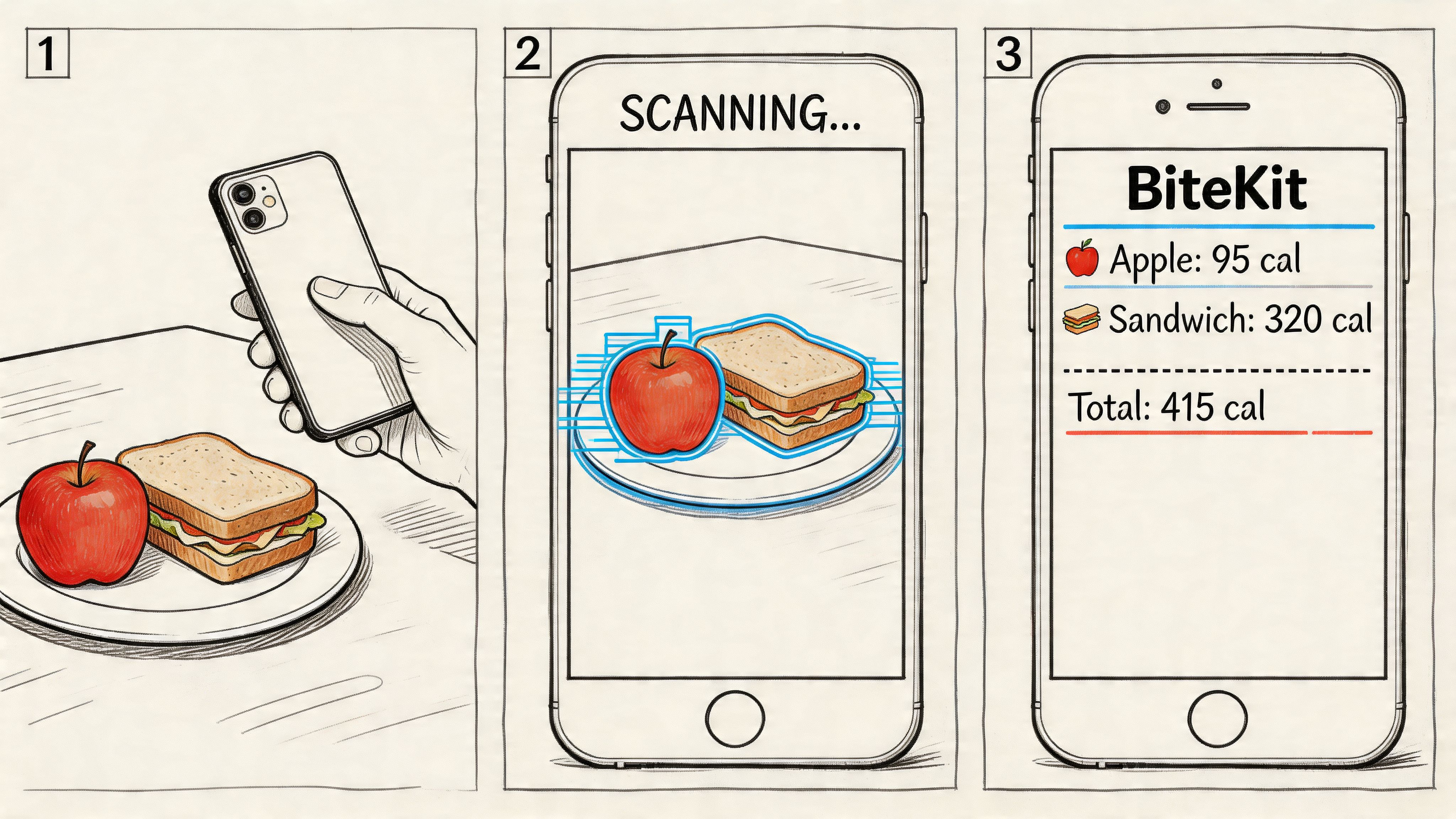
The app analyzes the image, identifies the likely foods, estimates the portions, and generates a nutrition entry with calories and macros. If something looks slightly off, you adjust it with a quick text or voice note such as “more rice” or “about 200g chicken.”
A simple first-use flow
The easiest way to think about the process is review first, then refine. You don't need to micromanage every gram before the app gives you a starting point.
-
Capture the meal
Use a clear photo that shows the full plate. -
Check the detected foods
See whether the app recognized the obvious items correctly. -
Add what the camera missed
Sauces, oils, toppings, or cooking details often need a short note. -
Confirm the entry
Once saved, the meal updates your daily totals.
For people who dislike search-heavy apps, this feels much closer to how eating happens. You log in the moment, not later from memory.
What makes this easier than old database searching
BiteKit is one example of an app that lets people log meals through photos, voice, or natural-language text while tracking calories, protein, carbs, and fat. It also keeps a date-organized meal history and shows progress toward daily goals in a visual format.
That kind of interface matters because it reduces decision fatigue. You aren't choosing between ten nearly identical food entries every time you eat chicken. You start with what the AI sees, then make a small correction if needed.
If you're new to AI tracking, don't aim for a flawless log on day one. Aim for a complete log. Consistency teaches you more than over-editing.
A good first week is simple. Log the meals you eat. Correct the obvious misses. Notice whether breakfast is under-proteined, whether snacks are habitual, and whether your portions look the way you assumed they did.
What to Look For in Your AI Nutrition Coach
Not every ai calorie counter app solves the same problem. Some lean heavily on large cloud-based databases. Some focus on fast photo scanning. Others try to act like full nutrition coaches. The right choice depends on what slows you down most: time, complexity, or trust.
Privacy deserves much more attention here than it usually gets. According to Your Health Magazine's overview of AI-powered calorie trackers, privacy and local data storage are major user concerns, yet most apps rely on cloud sync. That same source notes that apps using local-only data processing and requiring no user accounts address a real gap for people who want stronger protection for sensitive health data.
Cloud sync versus local storage
This confuses a lot of readers, so here's the simplest distinction.
A cloud-based app usually stores your meal logs, account data, and progress history on remote servers. That can make syncing across devices easy, but it also means your food history isn't only on your phone.
A local-first app stores your records on your device instead. That approach can appeal to privacy-conscious users who don't want an account tied to every meal, weight update, or macro target.
Neither setup is automatically right for everyone. But you should know which one you're choosing.
AI Calorie Counter App Feature Checklist
| Feature | What to Look For | Why It Matters |
|---|---|---|
| Accuracy approach | Photo recognition, voice logging, and easy correction tools | Better estimates are only useful if you can quickly fix mistakes |
| Food input methods | Support for photo, text, and spoken entries | Different meals are easier to log in different ways |
| Portion editing | Fast adjustments after the first AI estimate | Real meals aren't standardized, so editing needs to be simple |
| Interface clarity | Clean daily totals and readable macro views | A crowded app makes consistent use harder |
| History and trends | Organized meal history and easy review | Patterns matter more than one isolated day |
| Privacy model | Clear explanation of cloud sync or local storage | Food data is personal health data for many users |
| Account requirements | Optional or no-account use if privacy matters to you | Less account friction can feel more comfortable for some users |
| Lifestyle fit | Works for homemade meals, takeout, and busy days | The tool has to match real life, not ideal conditions |
A practical way to choose
If you coach clients or build systems around nutrition support, this article on scaling a nutrition coaching business is useful because it shows why operational simplicity matters when habits need to stick across many users, not just one motivated person.
For individual users, I suggest asking four questions before downloading anything:
- Do I want the app to remember everything in the cloud, or mostly stay on my device?
- Will I use photo or voice logging, or do I prefer text?
- Can I correct mistakes quickly without digging through menus?
- Does the app make me feel more informed, or more judged?
If you're comparing options, this guide to the best calorie tracking app can help you sort features by use case instead of by marketing language.
Your AI Calorie Counter Questions Answered
Can these apps handle homemade meals
Yes, but they work best when you help a little. A photo can identify visible foods, but homemade meals often include hidden oils, sauces, or mixed ingredients. The most reliable approach is to let the app make the first estimate, then add a short correction for whatever the camera couldn't see.
What about restaurant food without nutrition labels
These apps can still give a useful estimate based on what the meal appears to contain. That's often enough for pattern awareness and daily decision-making. If you're trying to be more precise, add notes about cooking method, side dishes, and obvious extras like dressing or butter.
Do I still need basic nutrition knowledge
Yes. The app is a tool, not a substitute for judgment. It can help you log intake and spot patterns, but it won't replace understanding hunger, meal balance, protein needs, or how different foods affect your energy and fullness.
Should I use an ai calorie counter app for a medical condition
Use caution. These apps can support awareness, but they aren't a medical device or a substitute for personalized clinical care. If you have diabetes, an eating disorder history, kidney disease, or another condition that affects your diet, talk with a doctor or registered dietitian before relying on app estimates.
Is privacy worth caring about if I'm just logging meals
Yes. Meal history can reveal routines, goals, health concerns, and behavior patterns that many people consider sensitive. If that matters to you, read the privacy model before you commit, not after you've already built months of logs.
If you want an option that supports photo, voice, and natural-language food logging while keeping data stored locally on your device with no account required, take a look at BiteKit. It gives you a practical way to track calories and macros without turning meal logging into a daily project.