Photo Food Diary App: The Future of Nutrition Tracking?
Discover how a photo food diary app uses AI to simplify calorie and macro tracking. Learn about benefits, accuracy, privacy, and how to choose the best app.
You open a food tracking app with good intentions. Breakfast was manageable. Lunch turns into a hunt through a giant database. Dinner is a homemade bowl with rice, chicken, avocado, sauce, and something crunchy you forgot to measure. By day three, tracking feels like a second job.
That’s the primary reason many people stop. It usually isn’t a lack of motivation. It’s friction.
A photo food diary app changes that starting point. Instead of searching, scanning, and typing first, you take a picture first. The meal becomes the record. The app helps with the rest. For many people, that shift feels more natural because it matches how we already use our phones. We see, snap, save.
The End of Tedious Food Logging
Traditional logging asks you to behave like a part-time data clerk. You need to remember ingredients, estimate portions, choose the right database entry, and hope the serving size matches what’s on your plate. That works for some people, especially those who love detail. For everyone else, the process often breaks the habit it’s supposed to support.
Photo-based tracking is growing for a reason. The global market for diet and nutrition apps, which includes this category, was valued at USD 2.14 billion in 2024 and is projected to reach USD 4.56 billion by 2030 according to Savor The App’s overview of photo food journal app growth. That growth reflects demand for easier tracking, not just more tracking.
Why visual logging feels easier
When people say they want to “eat better,” they usually don’t mean “spend more time entering food.” They want a tool that fits real life. A quick meal at work. A homemade dinner with mixed ingredients. A weekend restaurant meal that doesn’t come with a barcode.
A photo food diary app reduces that mental load because the first step is simple. Take a picture. That lowers the barrier to entry, especially on busy days when motivation is low.
Tracking works better when the logging method is easier than the excuse to skip it.
Visual logging also pairs well with planning. If you’re trying to reduce last-minute takeout or make weeknight meals more consistent, it helps to connect tracking with prep. A practical next step is learning how a meal planning and grocery list app can reduce decision fatigue before you even start logging.
It’s not just about calories
The most useful food tracking tools do more than count. They help you notice patterns. You may spot that your lunches are light and your evenings are snack-heavy. You may realize your “healthy” breakfast leaves you hungry two hours later. A visual diary makes those patterns easier to see because meals stay tied to images, not just numbers.
That matters. People don’t build lasting habits from perfect entries. They build them from repeatable actions.
What Exactly Is a Photo Food Diary App
A photo food diary app is a nutrition tracking app that starts with an image of your meal instead of a manual search. That sounds small, but it changes the whole experience.
In a traditional app, the workflow usually goes like this: type food name, choose among similar entries, adjust grams or servings, repeat for every ingredient. In a photo-first app, the workflow begins with capture. You snap your meal, then the app helps identify foods, estimate portions, and organize the entry.
Capture first, analyze second
That phrase is the easiest way to understand the category.
The photo acts like a receipt for what you ate. If the app offers analysis, that comes after. If the app is simpler and more journal-like, the image still creates a useful visual history. Either way, the burden shifts away from remembering every detail before you log.
Consider the difference between writing notes by hand during a busy lecture versus recording the lecture and reviewing it after. One asks you to process everything in real time. The other lets you capture first and make sense of it with less pressure.
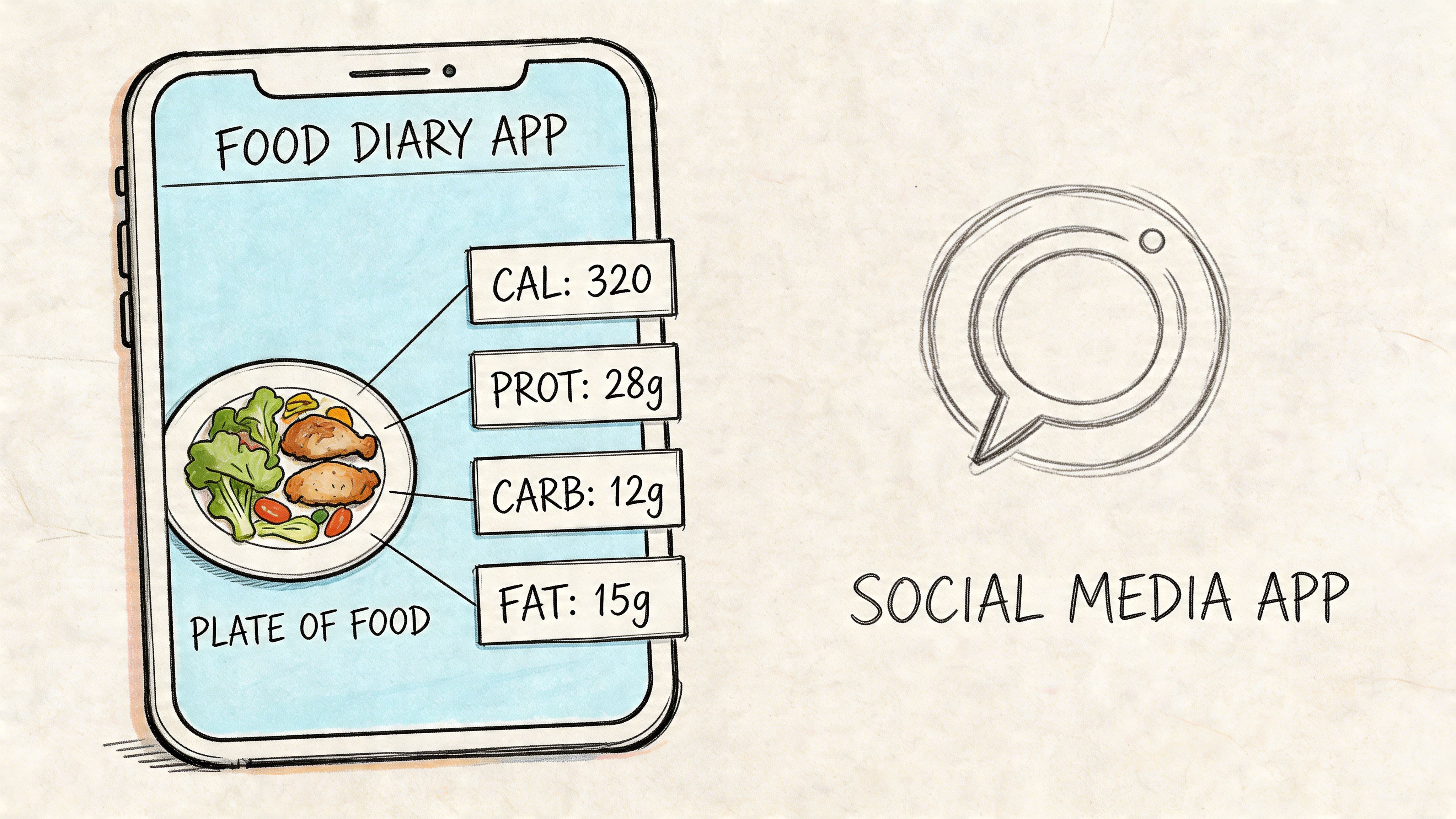
How it differs from social media food photos
At first glance, it can look similar. You take a picture of a plate with your phone. But the goal is different.
A social post says, “Look what I’m eating.”
A food diary entry says, “Help me understand my habits.”
That distinction matters because a diary app is organized around reflection. You’re building a timeline of meals you can review later. You can connect photos with notes, hunger level, macros, timing, or context like “late lunch after workout” or “ate quickly at desk.”
What beginners usually misunderstand
Many people assume these apps are only for calorie counters. They aren’t.
A photo food diary app can be useful if you want to:
- Notice meal patterns: You might discover you skip protein at breakfast or rarely eat vegetables at lunch.
- Build consistency: A quick photo is easier to repeat than a full manual log.
- Track without obsessing: Some people want awareness more than precision.
- Share with a coach or dietitian: Images often communicate real-world eating better than memory does.
Simple test: If typing every ingredient makes you avoid tracking, a photo-first method may fit your life better.
Some apps focus on macro estimates. Others focus on visual journaling. The best choice depends on whether you want detailed nutrition data, habit awareness, or both.
How AI Turns Your Photo Into Nutrition Data
The easiest analogy is this. AI in a photo food diary app works like a digital food detective. It looks at clues in the image, figures out what foods are present, estimates how much is there, and then compares that information with nutrition data.
That sounds mysterious until you break it into steps.
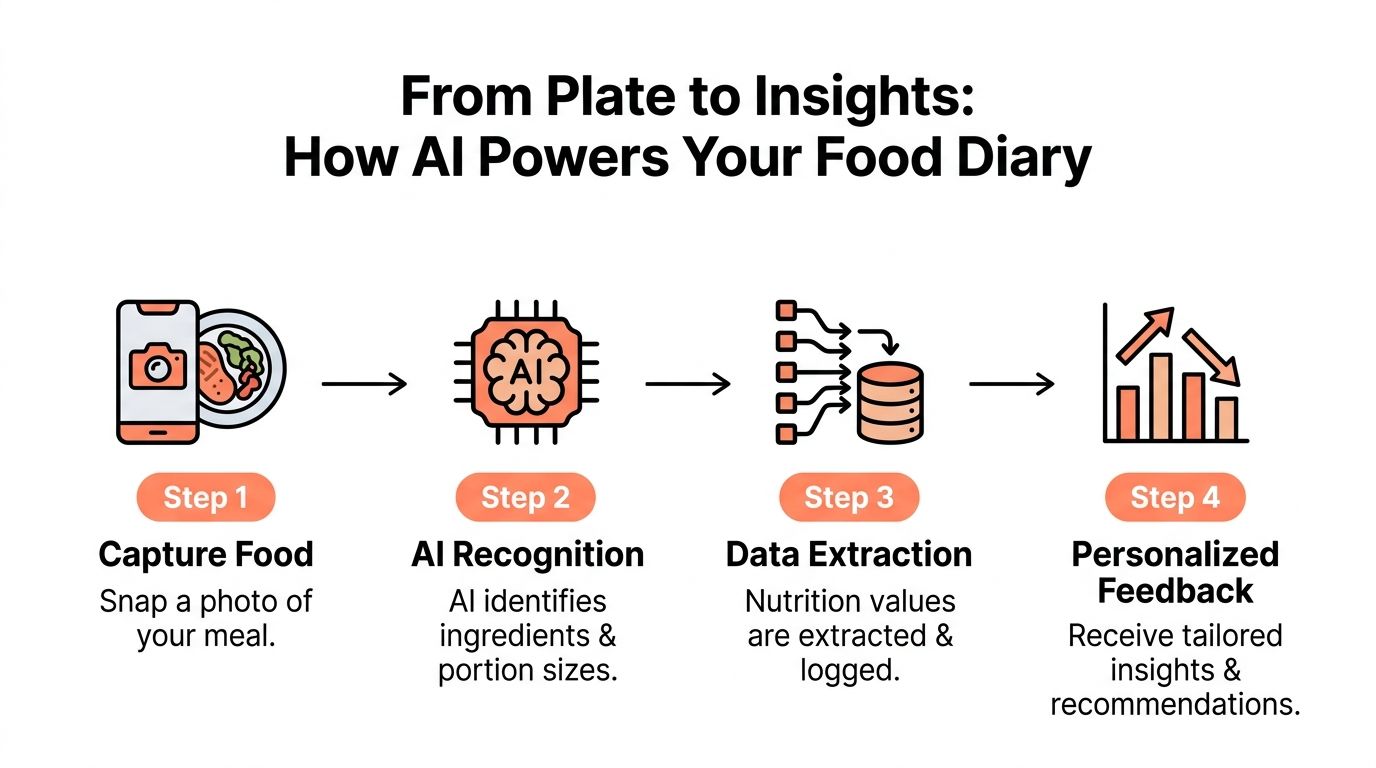
Step one sees the meal
The first job is image acquisition. In plain language, the app gets the photo you just took or selected.
Then computer vision starts examining the picture. It tries to separate the meal into recognizable parts. Rice might be one region. Chicken another. Vegetables another. This is called segmentation, but you don’t need the jargon to understand the idea. The system is trying to draw invisible outlines around different foods.
Lighting, plate angle, and visual clutter are important factors. A clean, well-lit shot gives the app more clues. A dark image of a mixed dish in a deep bowl gives it fewer.
Step two estimates what and how much
Once the app identifies likely foods, it has to guess portion size. This is the tricky part.
A human does something similar without noticing. You glance at a plate and think, “That looks like about a cup of pasta.” The app does a version of that using image features, object size, and learned patterns from prior examples. Some systems also combine image clues with other information, like text or voice you provide.
The technical pipeline described in this developer walkthrough of AI food tracking involves computer vision to segment and identify food items, then multi-modal inference to estimate macros by correlating pixel areas with density databases. It reports calorie predictions within 20 to 30% error margins on diverse dishes, compared with manual entry errors that can exceed 50%.
That doesn’t mean AI is perfect. It means it often beats rough human guessing, especially when people are rushed or inconsistent.
Step three converts food into nutrition numbers
After identification and portion estimation, the app maps the meal to nutrition data. That’s how you get calories, protein, carbs, fat, and sometimes fiber.
A useful comparison is manually reading food labels. Labels work well for packaged foods because someone already measured and standardized the product. Photo analysis tries to do something similar for the messier world of home cooking, restaurant plates, and mixed meals. It’s harder because there’s no neat serving printed on the bowl in front of you.
A food photo doesn’t contain nutrition facts. The app has to infer them from visible clues.
That’s why the review step matters. The smartest apps let you edit the result. If the app mistakes couscous for rice or misses the dressing, you should be able to correct it quickly. Fast review is part of accurate logging.
If you want a practical example of how image-based tracking compares with other methods, this guide to a photo calorie counter is useful because it shows where photo input fits in the broader context of tracking methods.
Why mixed input often works better than photo alone
Some meals are visually obvious. A banana, yogurt, and toast breakfast is straightforward. Other meals aren’t. A curry, casserole, smoothie, or sauce-heavy dish hides ingredients.
That’s why many strong systems use hybrid input. You take the photo, then add a quick note like “chicken curry with coconut milk” or say it out loud. Those extra clues reduce ambiguity.
Here’s the key idea:
- The image captures what was eaten
- Your note clarifies what the camera can’t know
- The app combines both to improve the estimate
This isn’t cheating the AI. It’s using common sense. A camera sees appearance. You know context.
What improves results in daily use
You don’t need perfect photography. A few habits help:
- Use decent lighting: Natural light or bright indoor light makes food boundaries clearer.
- Capture the full plate: Cropped meals leave out important evidence.
- Add context when needed: Sauces, oils, and hidden ingredients often need a quick note.
- Review before saving: Corrections make the log more useful over time.
If you think of AI as a first draft rather than a final answer, the whole category makes more sense. It’s not replacing your judgment. It’s reducing the amount of work needed to use it.
Real-World Benefits for Your Health Goals
The value of a photo food diary app shows up in ordinary routines, not just in tech demos. People stick with tools that fit their day.
One useful signal comes from Craving Mind’s review of photo food diary apps, which cites a 65% 7-day retention rate for intuitive photo-based apps. That matters because the best nutrition method isn't the most impressive one on paper. It’s the one you’ll still use next week.
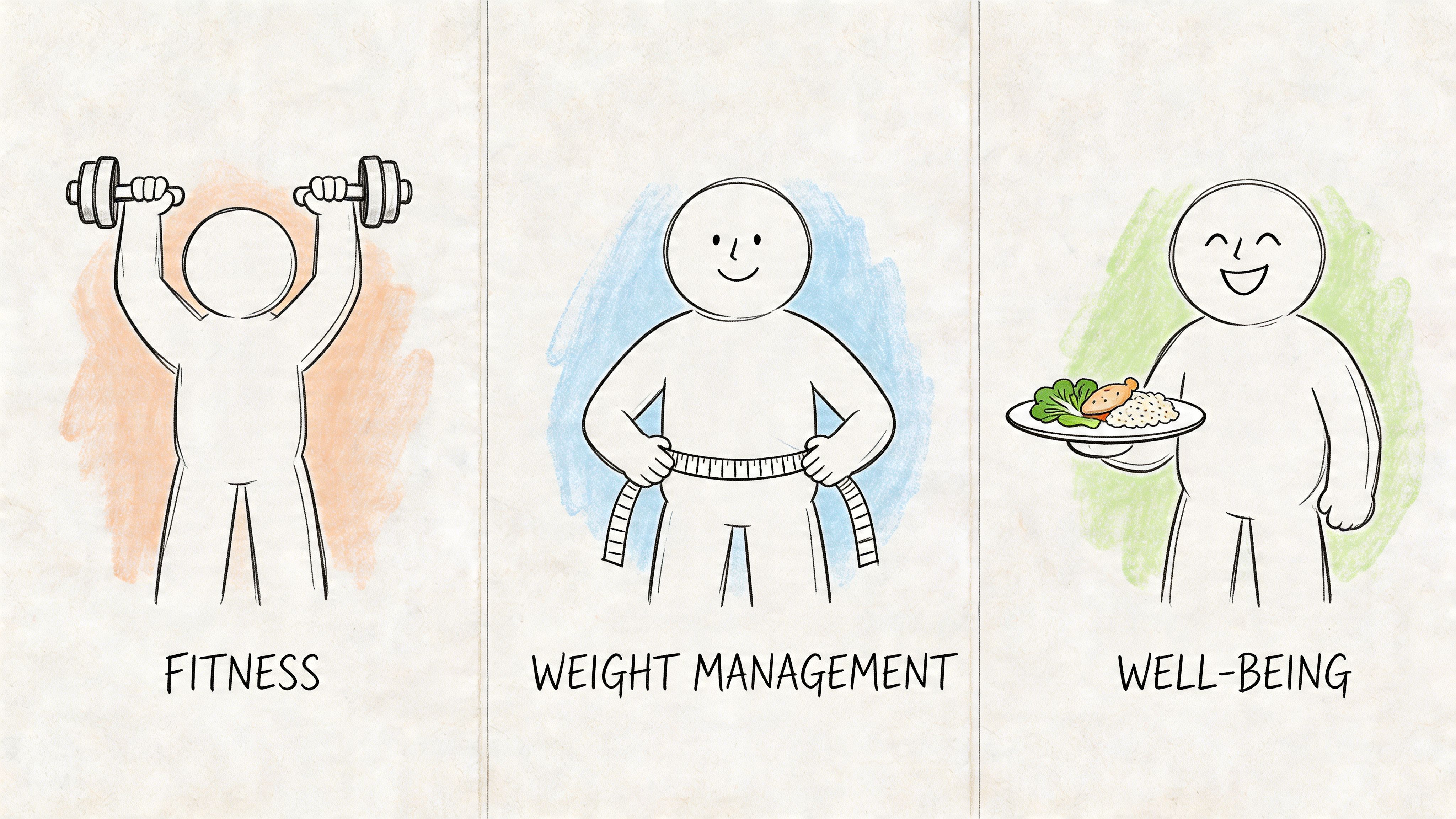
For someone focused on weight loss
Take a common situation. Someone wants to lose weight but keeps stopping after a few days of calorie tracking. They aren’t lazy. They’re overloaded.
A visual diary lowers the activation energy. Breakfast becomes a quick photo. Lunch is logged before the first meeting starts. Dinner doesn’t require rebuilding a recipe from memory. Over time, the person begins to notice patterns instead of just totals. Maybe weekday lunches are light, but evening portions grow when work runs late. Maybe weekends bring more grazing than expected.
That awareness can be more useful than chasing perfect precision. The photo creates a record you can review.
When people can see their routine, they often make better choices without needing constant willpower.
For an athlete chasing macro targets
An athlete has a different problem. They may already care about protein, carbs, and meal timing, but they don’t want logging to interrupt training or recovery.
A photo-based app helps because it reduces interruption. A post-workout meal can be logged quickly, then adjusted if needed. The athlete still reviews details, but the app handles the repetitive front-end work of identifying foods and estimating the meal.
That’s especially useful for mixed plates. A bowl with rice, lean protein, vegetables, and sauce is annoying to enter manually. A photo-first workflow keeps the focus on eating and training, not app management.
Here’s a short demo that helps make the category feel more concrete:
For a busy professional trying to stay on track
Busy professionals often don’t fail because they lack nutrition knowledge. They fail because the day gets fragmented. Coffee on the move. Lunch between calls. Dinner after mental energy is gone.
In that context, speed matters more than features. A quick photo can preserve the meal record even if full review happens later. That’s a big advantage over systems that demand complete attention at the moment you eat.
A visual record also makes “I don’t know why I’m not making progress” easier to troubleshoot. You may notice long gaps between meals, frequent desk snacks, or a pattern of late-night takeout after intense workdays.
Why the visual layer changes behavior
Numbers tell you how much. Photos often tell you how.
A diary full of meal images can reveal things that spreadsheets hide:
- Portion drift: Plates may become larger over time.
- Routine gaps: Skipped meals become visible in the day timeline.
- Food quality patterns: You can see how often meals include protein, produce, or highly processed foods.
- Context clues: Workdays, travel, and social events often show up in the images themselves.
That’s why visual tracking often feels less punishing. It supports reflection, not just compliance.
Navigating Accuracy Convenience and Privacy
A common initial question is, “Is it accurate enough?” That’s a fair concern. The better question is broader. “Is it accurate enough for my goal, convenient enough to keep using, and private enough to trust?”
Those three parts belong together.
What accuracy really means in daily use
A photo food diary app doesn’t weigh your meal in a lab. It estimates. Foods overlap, sauces hide ingredients, and restaurant plates don’t come with precise specs. Mixed dishes are especially hard because the camera can’t always tell what’s inside.
That said, convenience can improve practical accuracy over time. An imperfect log you keep is often more useful than a “perfect” method you abandon after three days. If the app makes it easy to review and correct entries, the estimate gets better where it matters most: repeated real-world use.
Where photo apps struggle
Some situations are easy for image recognition. Whole fruit, eggs, toast, salad components, and simple plated meals give the app clear visual clues.
Other situations are harder:
- Mixed dishes: Stews, curries, casseroles, and smoothies hide components.
- Poor lighting: Shadows reduce visual detail.
- Heavy toppings or sauces: Surface appearance can mask what’s underneath.
- Crowded plates: Foods blend into each other.
That’s why a good app should never trap you inside the photo alone. You should be able to add notes, edit ingredients, and adjust amounts without friction.
Convenience is valuable. Blind trust isn't. The strongest apps make correction easy.
Why privacy deserves more attention
Food logs look harmless until you think about what they reveal. Meal timing can reflect work patterns. Repeated restaurant photos can reveal your routines. Home meal images can expose your kitchen, family context, or health priorities. If the app syncs to the cloud, those images may travel far beyond your phone.
This is the blind spot most guides skip. Privacy in photo food diary apps is often treated like a footnote, even though users are storing sensitive behavior data. A privacy-focused summary cited in this discussion of food photo diary app privacy concerns notes that a 2025 Statista report found 72% of US/EU health app users worry about data breaches. That concern makes sense.
Cloud-first versus local-first
Not every app handles data the same way.
A cloud-first model usually means your meal photos and logs are uploaded to company servers for storage, syncing, analysis, or sharing. That can be convenient if you switch devices often or work with a coach. It can also create more exposure if the company stores more than you expect.
A local-first model keeps your data on your device as much as possible. Some apps also avoid account creation entirely. That doesn’t eliminate every risk, but it changes the trust equation. You’re sharing less by default.
If privacy matters to you, don’t stop at the marketing page. Read the actual privacy details that describe what an app stores and how it handles user data.
Questions worth asking before you log your first meal
Many people check whether an app has macro tracking, but skip the more important data questions. Ask these instead:
- Does it require an account: If yes, what personal data is tied to it?
- Are meal photos stored remotely: If yes, for how long?
- Can you delete your history easily: Deletion should be simple, not hidden.
- Does it explain data sharing clearly: Plain language matters.
- Can you use core features without social sharing or cloud backup: Optional should mean optional.
A food diary is a health record, even if it doesn’t look like one. Treat it that way.
How to Choose the Right Photo Food Diary App
Choosing a photo food diary app is less about finding the app with the longest feature list and more about finding the one you’ll keep using. A good app will offer five things: quick capture, editable results, a clear interface, sensible pricing, and a privacy policy that doesn’t raise questions.
One research-backed feature deserves special attention. A PMC study on the FoodNow app found that combining photos with voice or text descriptions improved coding accuracy to an 89% match rate against a national nutrient database, according to the FoodNow validation paper on PMC. That’s a strong reason to prefer apps that support more than one input method.
The practical checklist
| Feature | What to Look For | Why It Matters |
|---|---|---|
| Photo logging | Fast capture with minimal taps | If logging feels slow, you won’t do it consistently |
| Editing tools | Easy correction of foods and portions | AI estimates need review, especially for mixed dishes |
| Voice or text support | Ability to add context like ingredients or cooking method | Hybrid input helps reduce ambiguity |
| Clear meal history | Day-by-day visual timeline and simple review | Patterns are easier to spot when meals are organized well |
| Goal tracking | Daily calories and macros shown clearly | You need feedback that’s useful at a glance |
| Privacy policy | Plain explanation of storage, syncing, and deletion | Food photos can reveal sensitive personal information |
| Pricing model | Transparent subscription or one-time pricing | Hidden limits often show up after you build the habit |
| Cross-platform fit | Works smoothly on your device | Great features don’t matter if the app feels clunky |
What matters more than flashy AI
Many app listings promise smart recognition. That’s fine, but “smart” isn’t enough. You want a workflow that respects human reality.
A strong app should let you do three things without friction:
- Capture quickly
- Correct easily
- Review patterns later
If any of those steps is frustrating, the habit usually fades.
A simple way to compare options
Try this approach when testing apps for a few days:
- Log one homemade meal: See how the app handles mixed ingredients.
- Log one restaurant meal: Check whether it gives you enough control to adjust.
- Log one rushed meal: This tells you whether the app works in real life, not just in ideal conditions.
Also pay attention to how the app makes you feel. If it turns every meal into a tedious audit, you probably won’t stick with it. If it gives you structure with low friction, that’s a better sign.
Decision rule: Choose the app that reduces effort without taking away control.
If you want a simpler benchmark for what low-friction journaling can look like, this guide to a simple food journal app is worth reviewing before you commit to a more complex setup.
Privacy should be a deal-breaker, not a bonus
A lot of people treat privacy like an extra feature. It isn’t. It’s part of product quality.
If an app asks you to upload a library of food photos, connect outside services, and create an account, it should explain exactly what happens next. If that explanation is vague, move on. Nutrition tools should help you feel informed, not exposed.
Product Spotlight BiteKit for Private AI-Powered Tracking
One example that maps closely to the checklist above is BiteKit. It supports logging by photo, voice, or text, calculates calories and macros, shows progress against daily goals, and keeps a date-organized history for review. The notable difference is its no accounts, no cloud sync model, with data stored locally on the device.
That local-first setup directly addresses the privacy trade-off many users overlook. If your main hesitation about a photo food diary app is sending sensitive meal images to remote servers, this kind of design is worth paying attention to.
Why this example is useful
A lot of apps force you to choose between convenience and control. This model shows that you can combine fast logging with stronger privacy defaults.
Its feature mix also reflects what tends to work in practice:
- Photo input for quick capture
- Voice and text input for context the camera can’t infer
- Daily goal tracking so the data turns into action
- Local storage for users who don’t want a cloud-based food diary
That doesn’t mean it’s the right fit for every person. Someone who wants heavy coach collaboration or broad account syncing may prefer a different setup. But as a concrete example of privacy-first nutrition tracking, it shows what thoughtful design in this category can look like.
The Future of Food Tracking Is Visual
Food tracking is moving away from database hunting and toward a simpler behavior. See the meal. Capture the meal. Review the pattern.
That shift matters because individuals often don’t need more nutrition theory. They need a method they can keep using on normal days, not just highly motivated ones. A photo food diary app lowers friction, supports awareness, and can make macro or calorie tracking feel less mechanical.
The more important shift may be philosophical. Better tracking isn’t just about smarter AI. It’s about tools that respect your time, your attention, and your data. Convenience matters. Privacy does too.
If you understand those trade-offs, you’re in a strong position to choose well. The right app won’t eat perfectly for you. But it can make the habit of paying attention much easier to keep.
If you want a privacy-first way to track meals with photos, voice, or text, BiteKit is worth a look. It’s designed for fast calorie and macro logging without accounts or cloud sync, which makes it a practical option for people who want nutrition support without giving up control of their food data.